General settings
The shop name, the default language and the other site-wide settings.
Updated:
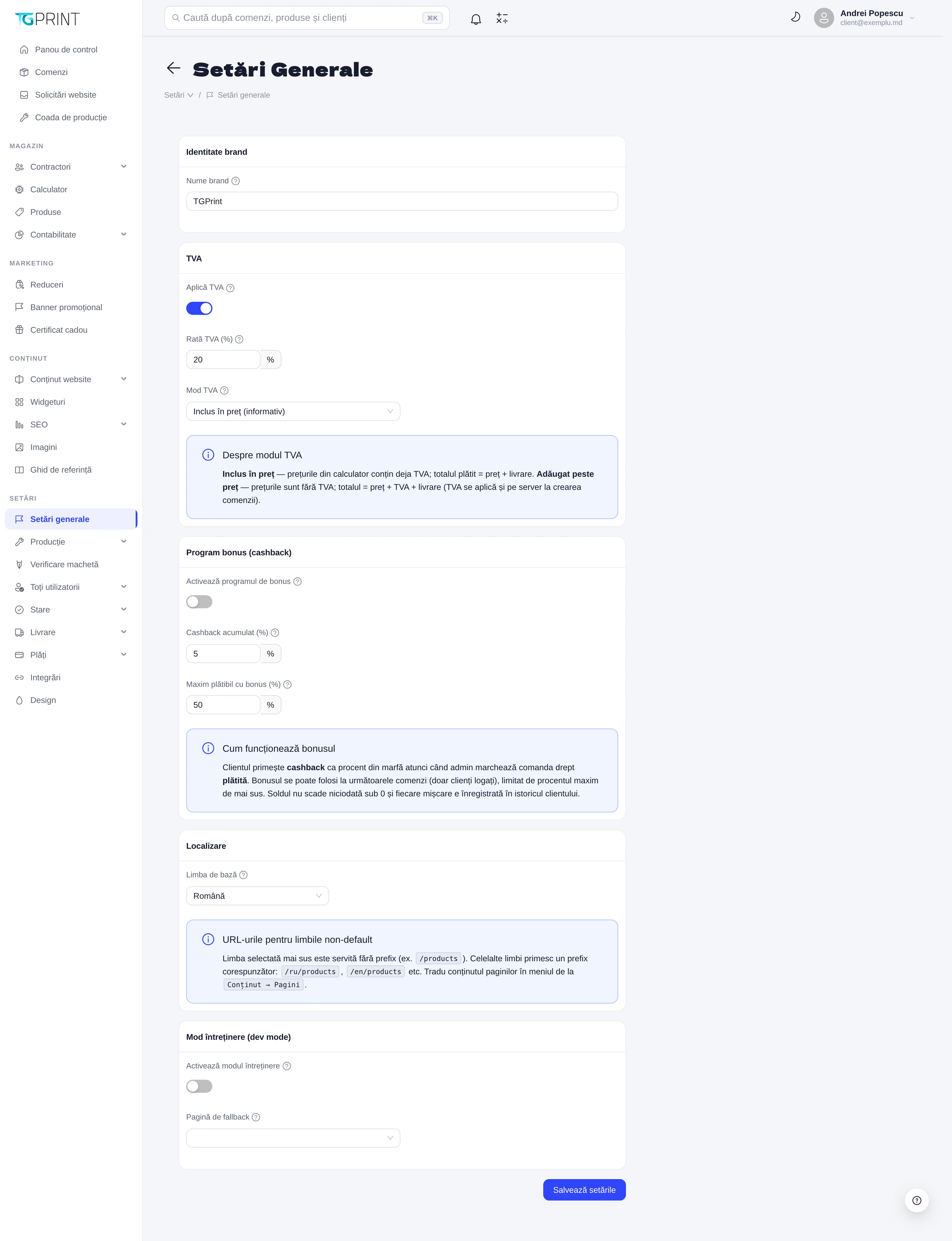
Settings → General Settings gathers a few decisions that concern the whole shop: what it is called, how VAT is applied, whether you offer a bonus (cashback), which languages the site is available in and whether it is temporarily closed for works. There are only a few fields, but each of them changes something across the entire site, so the page ends with a single button — Save settings — that applies them all at once.
Brand identity
Brand name — the name of the shop, used in page titles, in the emails sent to customers and in documents. The logo and the colors are not here but in Settings → Design — see Design.
VAT
- Apply VAT turns VAT calculation on; VAT rate (%) is the rate itself.
- VAT mode decides how the prices from the price calculator relate to VAT:
- Included in the price (informational) — the prices in the calculator already contain VAT; the total paid = price + delivery, and VAT is only displayed, for information, on the order and on the documents.
- Added on top of the price — the prices in the calculator are without VAT; the total = price + VAT + delivery. VAT is also applied on the server when the order is created, so it cannot be bypassed by a calculation performed in the browser.
Changing the mode does not recalculate existing orders — every order keeps the rule that was in force when it was placed.
Bonus program (cashback)
Enable the bonus program turns cashback on for customers:
- Cashback earned (%) — the percentage of the goods value that the customer receives as a bonus when an administrator marks the order as paid.
- Maximum payable with bonus (%) — how much of a future order can be covered from the bonus.
The bonus can only be used by signed-in customers, on their following orders; the balance never drops below zero and every movement is recorded in the customer's history (their card, Finances → Bonus, where you can also adjust it manually). See Customers, organizations and groups.
Localization
Default language is the language served without a prefix in the address (for example /products); the other languages get a prefix: /ru/products, /en/products. Choosing the default language also changes the language in which untranslated content is shown. Page texts are translated from Content → Website Content → Pages, product texts from each product's card, calculator texts from the Calculation tab (the RO switcher). The language of the admin panel is independent of this one and is chosen from each user's own account.
Maintenance mode (dev mode)
Enable maintenance mode temporarily closes the storefront: visitors see the fallback page chosen below (a page from Pages, with your message), while the admin panel stays accessible to the team. Use it for large works on the catalog or the design; don't forget to turn it off.
Note. The fields for the company's legal data (name, IDNO, bank) are not here but in Settings → Payments → For Legal Entities, because one shop can invoice from several companies. See Payments.