The reference guide
The reference books of the calculator: materials, operations and the other elements the price is built from.
Updated:
Content → Reference Book is the library the product calculators are built from: this is where the materials live (the papers, the laminates, the rigid substrates), the operations (printing, laser) and the additional operations (cutting, creasing, foil stamping, lamination, gluing…), the components (springs, eyelets, foils, stretcher bars) and the items, each with its price, its unit of measurement and its machine. When, on the Calculation tab of a product, you choose Material Paper or Operation Print, you are choosing from these lists — a price changed here propagates to every product that uses it.
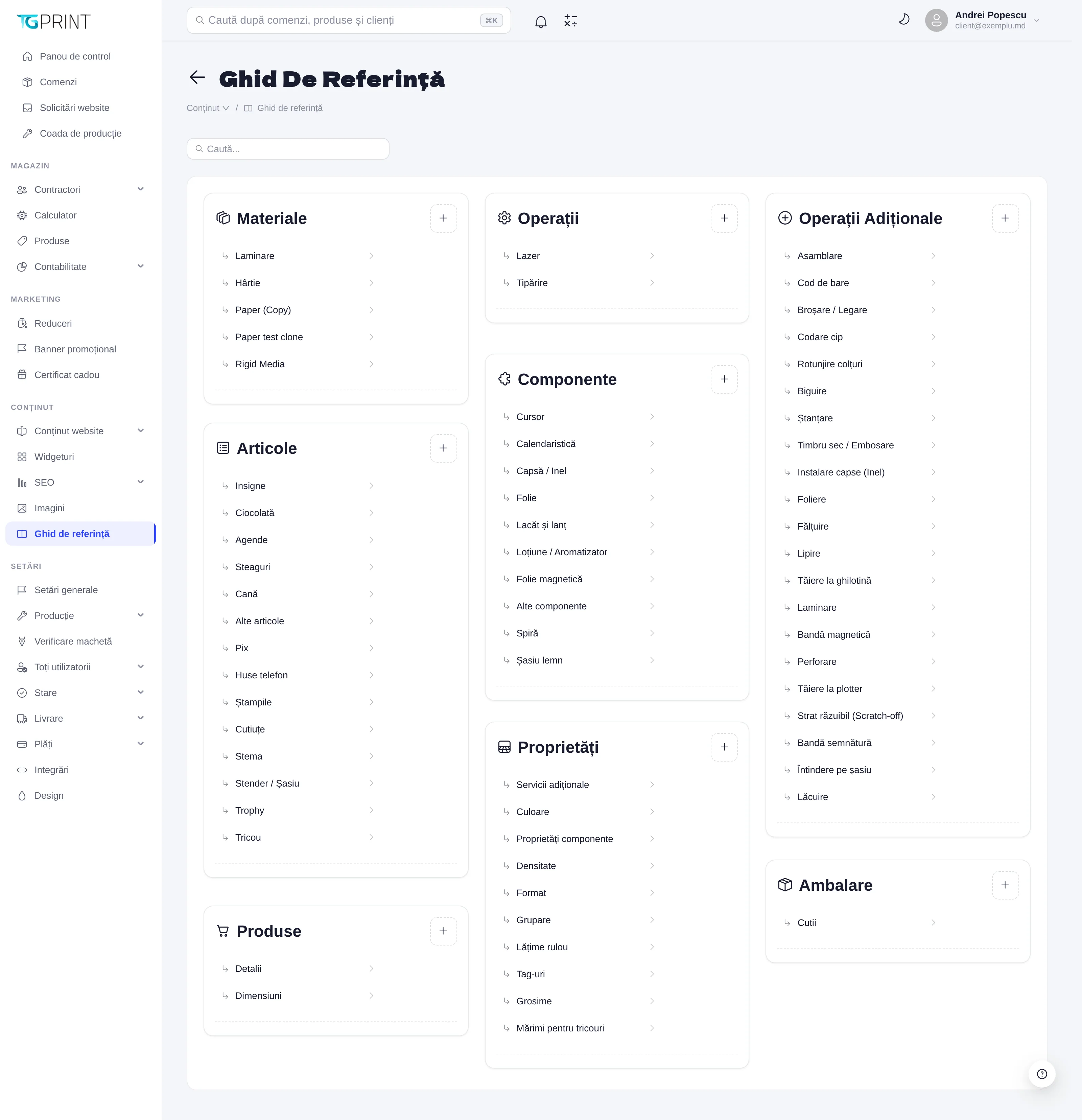
The groups
- Materials — Paper, Lamination, Rigid Media (rigid boards) and the other material reference tables; every material has a price “per” a unit (sheet, m2, piece) and the dimensions of the sheet.
- Operations — Printing (the printing machines, priced by quantity step or by area) and Laser.
- Additional Operations — the finishing: Assembly, Barcode, Binding / Perforation, Chip encoding, Corner cutting, Creasing, Die cutting, Embossing / Debossing, Eyelet installation, Foil stamping, Folding, Gluing, Guillotine cutting, Lamination, Magnetic stripe, Perforation, Plotter cutting, Scratch-off layer, Signature panel, Stretching on frame, Varnishing.
- Components — the physical pieces added to the product: Cursor, Date block, Eyelets, Foil, Lock and chain, Lotion / Aromatizer, Magnetic sheet, Spring, Stretcher bar, Other components.
- Items — finished products or semi-finished goods with a price of their own (Badges, Chocolate, Diaries…).
Clicking a reference table opens it.
A single reference table
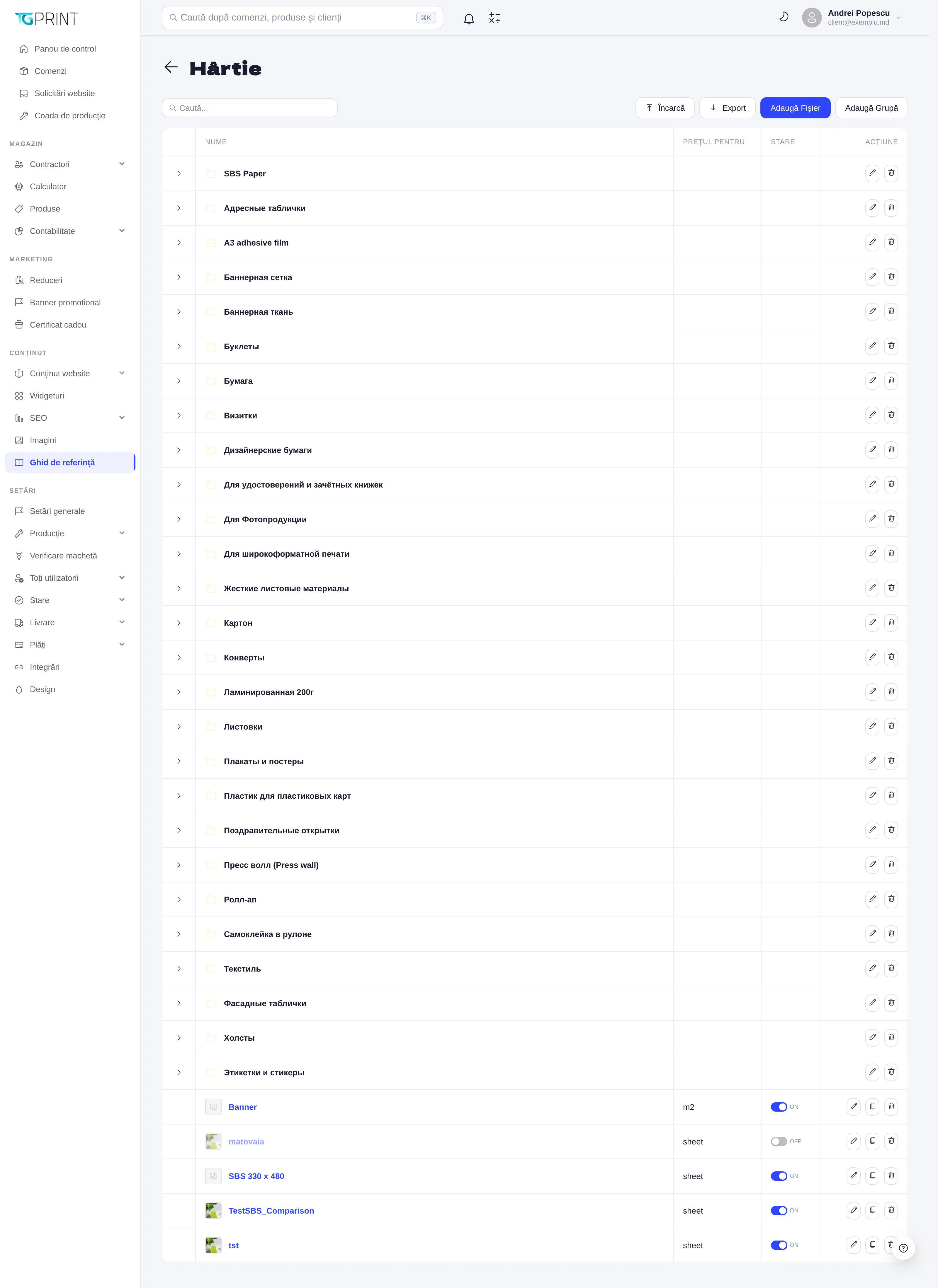
The page of a reference table (Paper, for example) has:
- The search and the actions at the top: Upload (import from a file), Export, Add File (a new entry) and Add Group.
- The groups — rows with an arrow (SBS Paper, Картон, Дизайнерские бумаги…) that organize the entries; expanded, they show the entries they contain.
- The entries — each with a Name, a Price per (the unit: sheet, m2, piece), a Status (ON / OFF: a switched-off entry can no longer be chosen in the calculators, but the products that already use it keep their calculation) and Actions (edit, duplicate, delete).
The form of an entry contains the name (with the public translations — the name shown to the customer may differ from the internal one), the prices by quantity step, the sheet dimensions for materials, the weight or thickness, the machine for operations and, optionally, a description and an image that the customer sees in the calculator when choosing the option.
How it connects to products
- You create or correct the material or the operation here, with the current price.
- In the product sheet, on the Calculation tab, you choose it in the right module (Material Paper, Operation Print, a finishing variant) and give it, where needed, a Coefficient — see Price calculation.
- On the storefront the customer sees the public name of the entry, with its description and image, and the price is recalculated from the values kept here.
Note. Deleting an entry that products use breaks their calculation: the variants that refer to it disappear from the calculator. Switch it off (OFF) instead of deleting it, and replace it in the products at the next price revision.